












What is Zero Trust Security? A Microsoft-Focused Guide for Safer Digital Environments in 2026

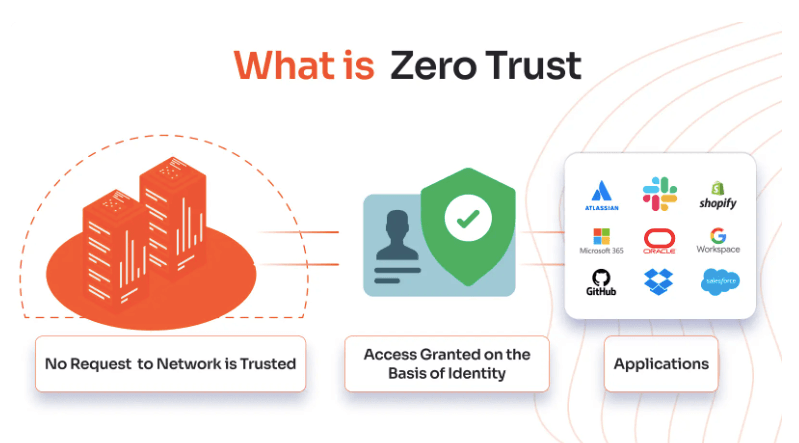
What is Zero Trust Security? A Microsoft-Focused Guide for Safer Digital Environments
As the world becomes increasingly digital, protecting your devices, data, and software is more critical than ever. With remote work, personal devices, and global connectivity on the rise, traditional firewall-based security models are no longer sufficient. Today’s attackers target users both inside and outside the network perimeter—and even legitimate software like Windows or Office products can be misused after a basic breach.
But there’s a better approach for businesses and individuals alike: Zero Trust Security.
🔐 What is Zero Trust Security?
Zero Trust Security is a cybersecurity framework that operates on a fundamental principle:
👉 “Never trust, always verify.”
Unlike traditional models, Zero Trust never automatically trusts anyone, not even users or devices inside the company network. Instead, it enforces continuous verification of identities, restricted access, and real-time monitoring for every access request.
So, what is Zero Trust Security in relation to Microsoft products? Simply put, it’s a way to make platforms like Windows and Office 365 significantly more secure by limiting who can do what, where, and when.
💡 Microsoft’s Role in Zero Trust
Microsoft has fully embraced What is Zero Trust Security principles and offers a wide range of solutions that support it, such as:
- Microsoft Entra ID (formerly Azure Active Directory) – For identity and access management
- Microsoft Defender for Endpoint – To secure Windows devices
- Intune & Endpoint Manager – For device compliance and control
- Office 365 Security & Compliance Center – To protect Microsoft Office apps and files
- Windows Hello, BitLocker, and SmartScreen – Built-in on Windows systems
If you’re buying Microsoft products from AffordableKey.com, you’re already using platforms that can benefit from — or even help implement — a Zero Trust approach.
🧱 Core Principles of Zero Trust Security
Whether you’re using Windows 11 Pro, Microsoft 365, or Windows Server, What is Zero Trust Security revolves around the following core principles:
1. Verify Explicitly
Don’t assume anyone is safe. Authenticate each user — using Multi-Factor Authentication (MFA) and security signals — every time.
2. Use Least Privilege Access
Users should only have access to the files, apps, or settings they need. This applies to Windows file sharing, Office 365 admin roles, and more.
3. Assume Breach
Design your systems expecting that a breach has already occurred. For example, Office 365 DLP policies ensure that even leaked documents stay encrypted.
🖥️ Practical Applications in Microsoft Environments
Let’s look at What is Zero Trust Security integrates with Microsoft products sold at AffordableKey.com:
✔️ Windows Operating Systems (Windows 10, 11, Server)
- BitLocker: Encrypts the entire hard drive to prevent unauthorized access.
- Windows Hello: Uses biometrics to verify identities confidently.
- Smart App Control: Blocks untrusted or malicious apps.
✔️ Microsoft Office 365
- Sensitivity Labels: Add protection to Word, Excel, or Outlook files.
- Conditional Access: Allow Office apps to open only on secure, compliant devices.
- Defender for Office 365: Scans attachments and links for phishing threats.
✔️ Microsoft Entra (Azure Active Directory)
- Identity governance: Control who has access to what + automatic revocation.
- MFA & Security Defaults: Add an extra step of verification during logins.
When you purchase any Windows or Microsoft Office product from AffordableKey.com, you’re setting up a trusted and versatile foundation for integrating Zero Trust principles.
🧩 Key Tools for Microsoft Zero Trust Implementation
| Security Component | Microsoft Solution |
|---|---|
| Identity Verification | Microsoft Entra ID |
| Device Compliance | Microsoft Intune |
| Threat Protection | Microsoft Defender |
| Remote Access | Conditional Access Policies |
| Data Encryption | Microsoft Purview / BitLocker |
| Document Control | Microsoft Information Protection |
By combining these together, businesses can fully implement What is Zero Trust Security using Microsoft tools—many of which come included with your software license from AffordableKey.com.
📈 Benefits of Using Zero Trust with Microsoft Products
1. Built-In Security
When you activate Windows or Office 365 Pro Plus, you gain access to powerful security features built into the software and compatible with Zero Trust.
2. Streamlined Identity Management
Use Microsoft Entra ID and MFA to reduce password-related breaches, which are responsible for 80% of phishing attacks.
3. Better Compliance
Regulatory standards like HIPAA, GDPR, and ISO 27001 are easier to meet with Microsoft Zero Trust tools.
4. Increased ROI
Maximize your investment in Microsoft licenses by turning on What is Zero Trust Security features included for free or at low cost, such as data loss prevention, file protections, or login security.
📝 How to Start Zero Trust on a Budget (Perfect for Small Businesses)
At AffordableKey.com, we understand that not everyone has a big IT budget. That’s why we recommend these low-cost steps to start:
✅ Step 1: Buy Genuine Microsoft Products
Start by purchasing secure and authentic Windows OS and Office software keys from reputable vendors (like us!).
✅ Step 2: Enable Multi-Factor Authentication
Use Microsoft Entra to activate MFA across all your admin and employee accounts.
✅ Step 3: Encrypt Your Devices
Use BitLocker, available in Windows Pro editions, to encrypt sensitive devices like company laptops.
✅ Step 4: Use Conditional Access for Office 365
Control who can access cloud documents based on location, device status, or other conditions.
✅ Step 5: Monitor with Windows Security Tools
Turn on real-time protection with Microsoft Defender and receive alerts about any unusual activity.
If you need help choosing the right Microsoft edition that includes these features, check out our buying guides at AffordableKey.com.
⚙️ AffordableKey.com Recommends
Here’s how to harden your environment using affordable Microsoft products:
| Product | Why Use It |
|---|---|
| Windows 11 Pro | Includes BitLocker & Hyper-V Security |
| Windows Server 2022 | Ideal for segmenting networks with micro-perimeters |
| Office 365 Pro Plus | Comes with data security features for Word, Excel, and Outlook |
| Microsoft Visio and Project | Protect sensitive project documentation easily |
| Microsoft Defender for Endpoint | Advanced threat detection without third-party costs |
All of these are available at discounted prices via our secure digital platform at AffordableKey.com.
🙋♂️ Frequently Asked Questions (FAQs)
Q1: Does Zero Trust slow down performance?
No! Today’s Zero Trust models use intelligent background checks and policies to ensure smooth, secure user experiences—especially with Microsoft’s integration.
Q2: Is Zero Trust only for big enterprises?
Not at all. Thanks to cloud-based solutions like Microsoft 365 Business Premium, even small companies can set up Zero Trust features affordably.
Q3: Can I enable Zero Trust on a personal computer?
Absolutely. Even individual users can apply What is Zero Trust Security strategies:
- Enable BitLocker
- Use strong passwords + MFA
- Turn on Smart App Control
And of course, buy your Windows key from AffordableKey.com to ensure your copy is legitimate and secure.
🛒 Start Securing with Microsoft, Powered by Zero Trust
What is Zero Trust Security to secure your home office or small business systems? Visit AffordableKey.com today for:
✅ Genuine Microsoft software licenses
✅ Affordable pricing and instant delivery
✅ Guaranteed activation and customer support
✅ Expert advice on getting started with security best practices like Zero Trust
🧠 Final Thoughts
So, what is Zero Trust Security? It’s not just IT jargon—it’s a practical security model that Microsoft fully supports across its platforms. Whether you’re an IT admin for a growing company or a solo entrepreneur working remotely, implementing What is Zero Trust Security helps protect your devices, data, emails, and user identities from cyberthreats.
Thanks to Microsoft’s built-in tools and affordable licensing options from AffordableKey.com, embracing Zero Trust Security has never been easier or more cost-effective.



