How to Choose the Right Windows 11 Edition for Your PC (2026 Guide)

How to Choose the Right Windows 11 Edition for Your PC
Looking to buy Windows 11 but not sure which edition suits your needs? You’re not alone! With several editions available—Windows 11 Home, Pro, Enterprise, and more—it can be confusing to find the one that’s the perfect fit for your PC, whether you’re a casual user, power user, or business owner.
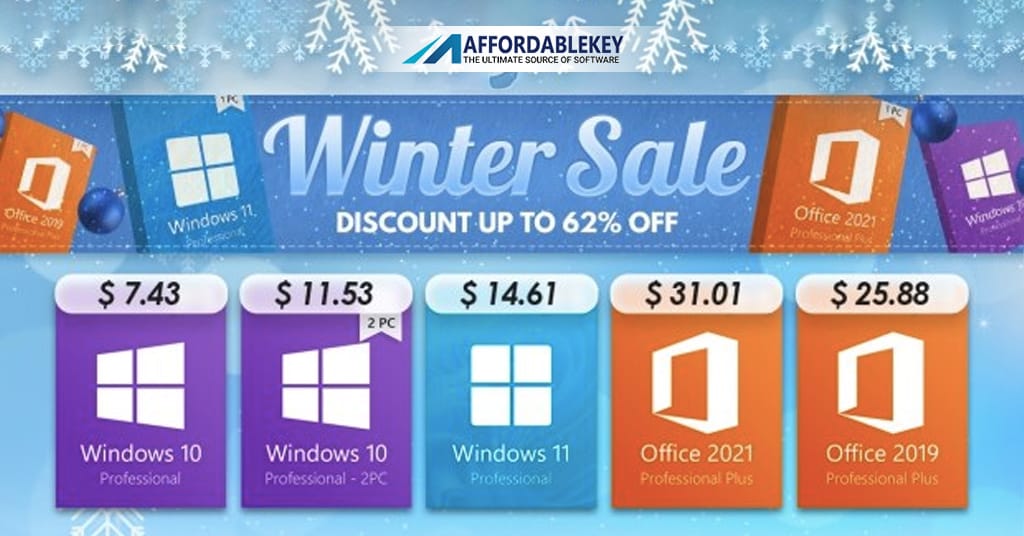
In this guide, we’ll break down the key features, differences, and use cases of Windows 11 editions, helping you choose the right one with confidence. And don’t worry—when you’re ready to buy, AffordableKey.com offers 100% genuine Windows 11 licenses at unbeatable prices.
💡 Why Choosing the Right Windows 11 Edition Matters
Selecting the right edition of Windows 11 isn’t just about cost. It’s about functionality, security, performance, and productivity. Choosing an edition that lacks features you need can slow down your work, while overpaying for features you don’t use is simply wasteful.
So before you click “Buy,” let’s explore your options.
🏠 Windows 11 Home: For Everyday Use
✅ Best For:
- Home users
- Students
- Gamers and casual users
🔧 Key Features:
- Sleek, modern Windows 11 interface
- Microsoft Edge, Snap Layouts, Widgets
- DirectStorage & Auto-HDR for gaming
- Microsoft Store access
- Built-in security like Windows Hello & Defender
- Android app support
❌ Missing Features:
- No BitLocker encryption
- No Group Policy Editor
- Limited networking & remote access tools
💰 Price: Affordable and great value for home users
➡ Buy now from AffordableKey.com — Save up to 70% on retail pricing.
Verdict: If you’re a casual or light user who browses the web, watches movies, uses Microsoft Office, or plays games—Windows 11 Edition is perfect for you.
👨💼 Windows 11 Pro: For Professionals & Power Users
✅ Best For:
- Professionals
- Freelancers
- Small business owners
- Remote workers
🔧 Key Features (In addition to all Windows 11 Home features):
- BitLocker encryption for data protection
- Remote Desktop for accessing your PC remotely
- Group Policy Management
- Hyper-V virtualization for testing VMs
- Assigned Access and Enterprise Mode IE
- Support for join to domain / Azure AD
🛡️ Security & Control:
- Enhanced device encryption
- Secure boot and TPM 2.0 compatibility
- Local and remote user policies
💰 Price: More expensive than Home, but packed with business-grade features
➡ Get Windows 11 Pro from AffordableKey.com at exclusive discounted prices
Verdict: If you need advanced tools, remote desktop access, or data security features for work or complex tasks, go with Windows 11 Edition—the most popular edition among professionals.
🏢 Windows 11 Enterprise: For Medium to Large Businesses
✅ Best For:
- Corporations and large IT teams
- Organizations managing 50+ employees
- Enterprise-level deployments
🔧 Key Features (All Pro features, plus):
- Windows Defender Application Control
- Credential Guard & Device Guard
- Advanced App Control and Management
- Long-Term Servicing Channel (LTSC)
- Custom provisioning and advanced update controls
💰 Price: Volume licensing only (not typically available on retail sites)
🏢 Need Enterprise? Contact a Microsoft distributor or licensing partner.
Verdict: Designed for big corporations with a dedicated IT department, Windows 11 Enterprise offers maximum control, security, and scalability. It’s not needed for most individuals or small businesses.
🧑🎓 Windows 11 Edition: For Students and Institutions
✅ Best For:
- Educational institutions
- Students eligible through school programs
🔧 Key Features:
- Same core features as Enterprise
- Lower-priced or free via academic licensing
❗ Availability:
- Not for public sale
- Must be obtained through authorized academic programs
Verdict: If your school provides Windows 11 Education, take advantage! Otherwise, Windows 11 Home or Pro will meet most of your educational needs.
📊 Quick Comparison Table: Windows 11 Home vs. Pro vs. Enterprise
| Feature | Windows 11 Home | Windows 11 Pro | Windows 11 Enterprise |
|---|---|---|---|
| BitLocker Encryption | ❌ | ✅ | ✅ |
| Remote Desktop | ❌ | ✅ | ✅ |
| Group Policy | ❌ | ✅ | ✅ |
| Hyper-V Virtualization | ❌ | ✅ | ✅ |
| Azure AD Support | ❌ | ✅ | ✅ |
| App Management & Control | ❌ | ❌ | ✅ |
| Ideal For | Casual Users | Professionals / SMBs | Corporations / IT Admins |
📁 Which Windows 11 Edition Should You Choose?
▶ If you’re a casual user or gamer:
- Go for Windows 11 Home
- Affordable, fast, and feature-rich for everyday tasks
▶ If you’re a professional, freelancer, or remote worker:
- Choose Windows 11 Pro
- Offers serious security and productivity tools
▶ If you’re buying for a company or IT department:
- Consider Windows 11 Enterprise or volume Pro licensing
- Advanced features for scalable deployment and management
Don’t waste money on editions you’ll never use—get exactly what you need, and nothing more.
🛍️ Where to Buy Genuine Windows 11 Edition Keys?
At AffordableKey.com, we offer:
- ✅ 100% genuine Microsoft license keys
- ✅ Instant digital delivery
- ✅ Lifetime activation guarantee
- ✅ Windows 11 Home & Pro at discounted prices
- ✅ Friendly customer support to help with setup
Forget overpriced retail boxes. Activate your system securely and affordably with us today.
🔧 How to Install Your Windows 11 Edition After Purchase
- Buy the right edition from AffordableKey.com.
- Download Windows 11 from winofficeiso.com
- Use the license key we provide during installation.
- Activate and enjoy all the full features of Windows 11.
Need guidance? Our support team is ready to assist!
❓Frequently Asked Questions (FAQs)
👉 Which Windows 11 edition is best for gaming?
Windows 11 Home is perfect for gaming. It includes DirectStorage, Auto-HDR, and superior game compatibility.
👉 Can I upgrade from Windows 11 Home to Pro later?
Yes. You can easily upgrade to Pro via settings and use your Pro license key from AffordableKey.com to activate.
👉 Will my old apps work on Windows 11?
Yes. Windows 11 supports most legacy Windows apps and software. Always check compatibility before upgrading.
👉 Is Windows 11 Pro worth it for home use?
If you want data encryption, remote access, or manage multiple user accounts, yes—it’s worth considering.
👉 What if I install the wrong edition?
If you purchase the wrong version, contact our support team. In most cases, we’ll help you switch or upgrade on the spot.
📝 Final Thoughts
Knowing how to choose the right Windows 11 edition is essential whether you’re upgrading an old PC, building a new one, or setting up a business environment. Choosing the right version saves money and ensures you’re not missing critical features.